Understanding Hex Codes
At the core of the hex code system are triangles and triplets. Hex means six, and each hex code is made up of six digits, three color channels. However, one big reason hex codes can often seem confusing is that modern color pickers are usually set up in rectangle format. This quad format doesn't lend itself well to a clean graph of the way hex codes actually work.
Understanding 0–F
In the hex code system, 0 represents black and F represents white. Counting from 0 to F goes like this: 0, 1, 2, 3, 4, 5, 6, 7, 8, 9, a, b, c, d, e, f.

There are 16 steps in the hex code spectrum, and since the number ten cannot be represented by a single numerical digit, letters are used instead to denote the numbers ten, eleven, twelve, etc. This is one of the first things that makes hex codes confusing — the number system runs from 0 to F. Think of 0 as no light and F as maximum light (this will become relevant when we move from black and white to color). That's why 000000 shows up as black and ffffff shows up as white.
Six Pure Colors
How 000000 and FFFFFF become RRGGBB
There are six possible permutations of pure color in the hex system.
There are three channels that make up a hex code: the red channel, the green channel, and the blue channel — RRGGBB. Full red is denoted as FF0000, full green is denoted as 00FF00, and full blue is denoted as 0000FF. Yellow is composed of both full red and full green, with zero blue: FFFF00. Cyan is composed of no red, full green, and full blue: 00FFFF. And magenta is composed of full red, no green, and full blue: FF00FF.
Triangles, Not Rectangles
Hex codes can be thought of as triangles in the sense that for each color channel, we have three potential corners to our triangle: pure white, pure black, and pure color.
Tap each color swatch to see its color triangle.
RGB and CMY
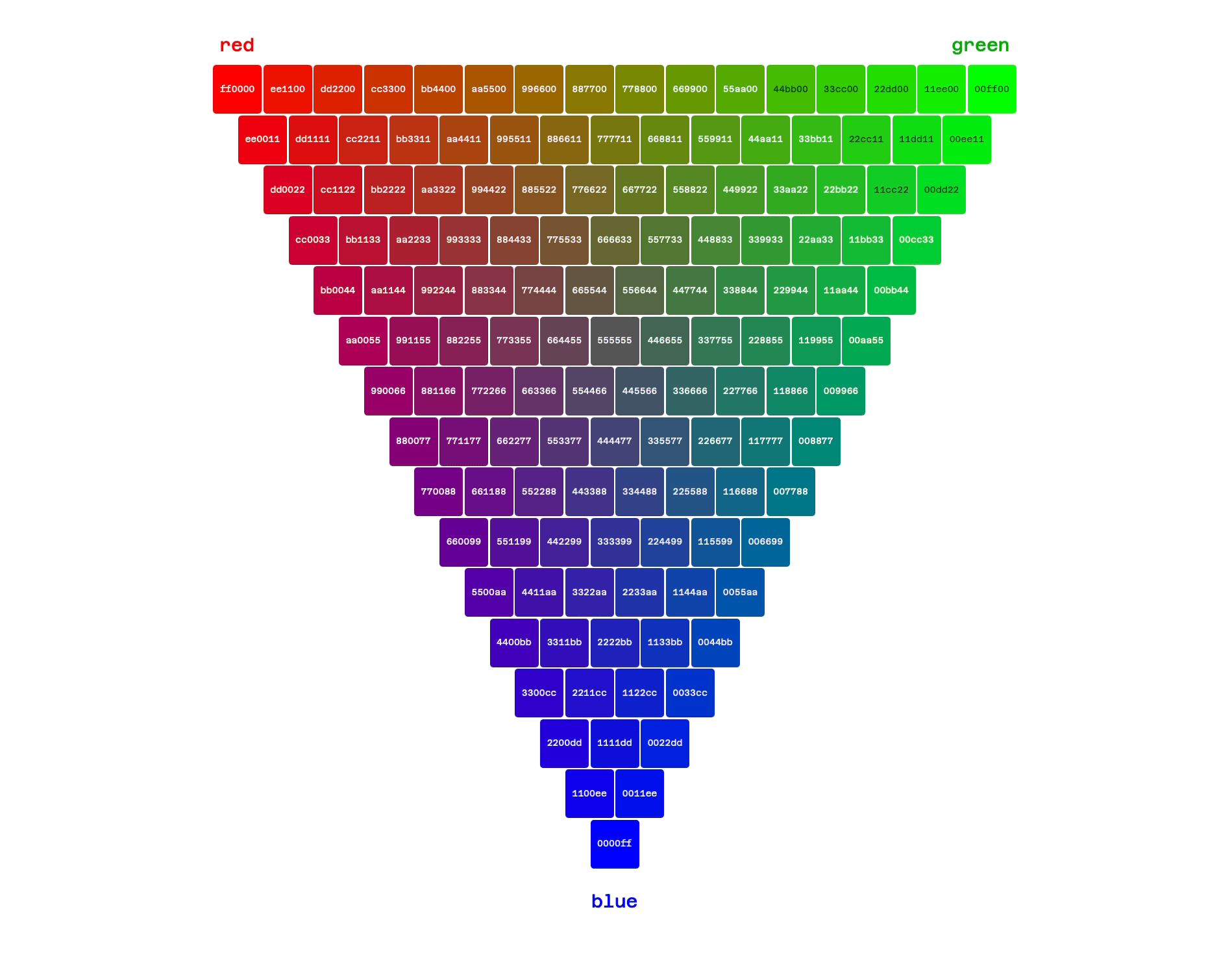
Now let's revisit the six possible permutations of pure color in the hex system. We can show these permutations as triangles as well. If we put one full color channel in each corner, we get the red–green–blue triangle. Notice red is denoted as FF0000 — maximum light on the red channel, no light on the green or blue channels. Maximum light on the green channel is 00FF00. And maximum light on the blue channel is 0000FF.
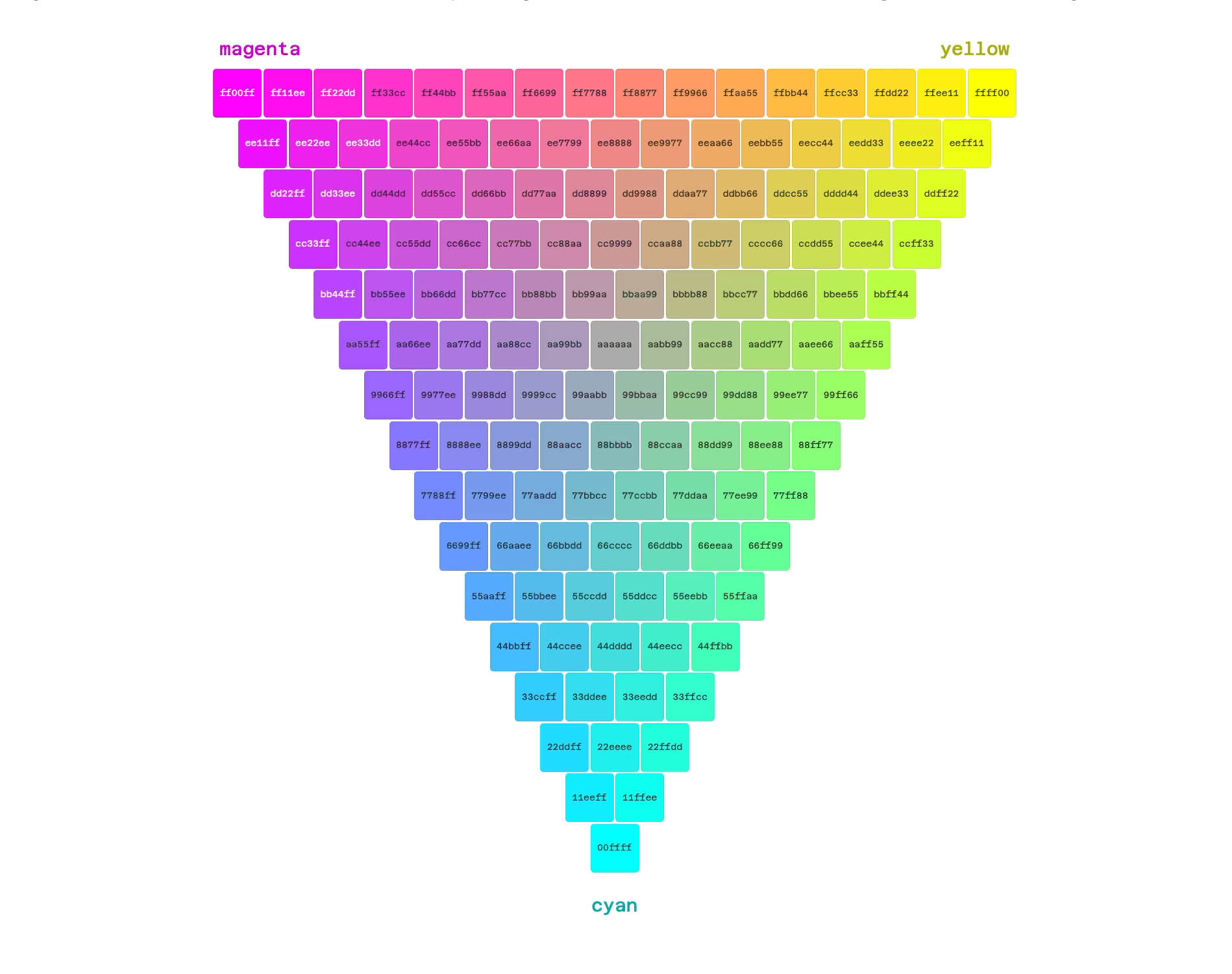
If we put two full color channels in each corner, we get the cyan–magenta–yellow triangle. The CMY triangle appears brighter because each corner has two light channels and one dark channel, whereas the RGB triangle appears darker because each corner has one light channel and two dark ones. Cyan is 00FFFF (maximum light in the green and blue channels), magenta is FF00FF (maximum light in the red and blue channels), and yellow is FFFF00 (maximum light in red and green).
Half Steps, Sixteenth Steps
The next concept to understand involves the way each individual color channel is divided. For example, the red channel [RR]GGBB has two slots. FF in the red channel denotes full red. But what does F0 or 0F represent? Let's look at it visually:
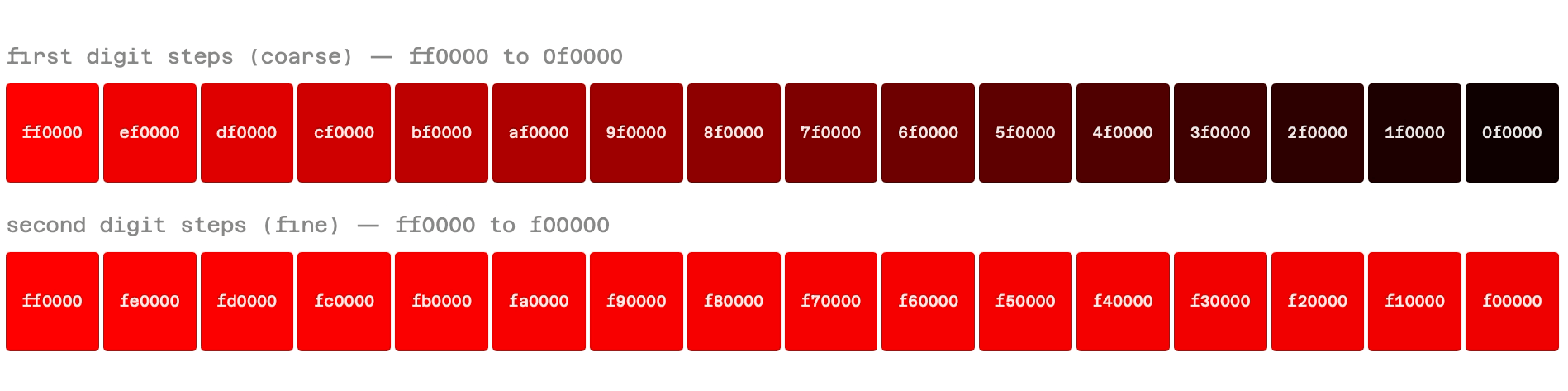
As you can see, changing the first digit in the red channel (changing FF to 0F) turns the swatch to black. But changing the second digit in the red channel (changing FF to F0) is an almost imperceptible change. That's because the first digit in each color channel is the one that matters most. Each step in the first channel digit represents sixteen steps in the second channel digit. Remember, our hex code steps go from 0 to F (16 steps). So the first digit in each channel represents 16x more change than the second channel.
How Triangles Become Squares and Rectangles
You may be wondering, if hex codes really make more sense as triangles, why do most color pickers represent them as rectangles? The truth is, they probably shouldn't, but here are a few ways of visualizing it.
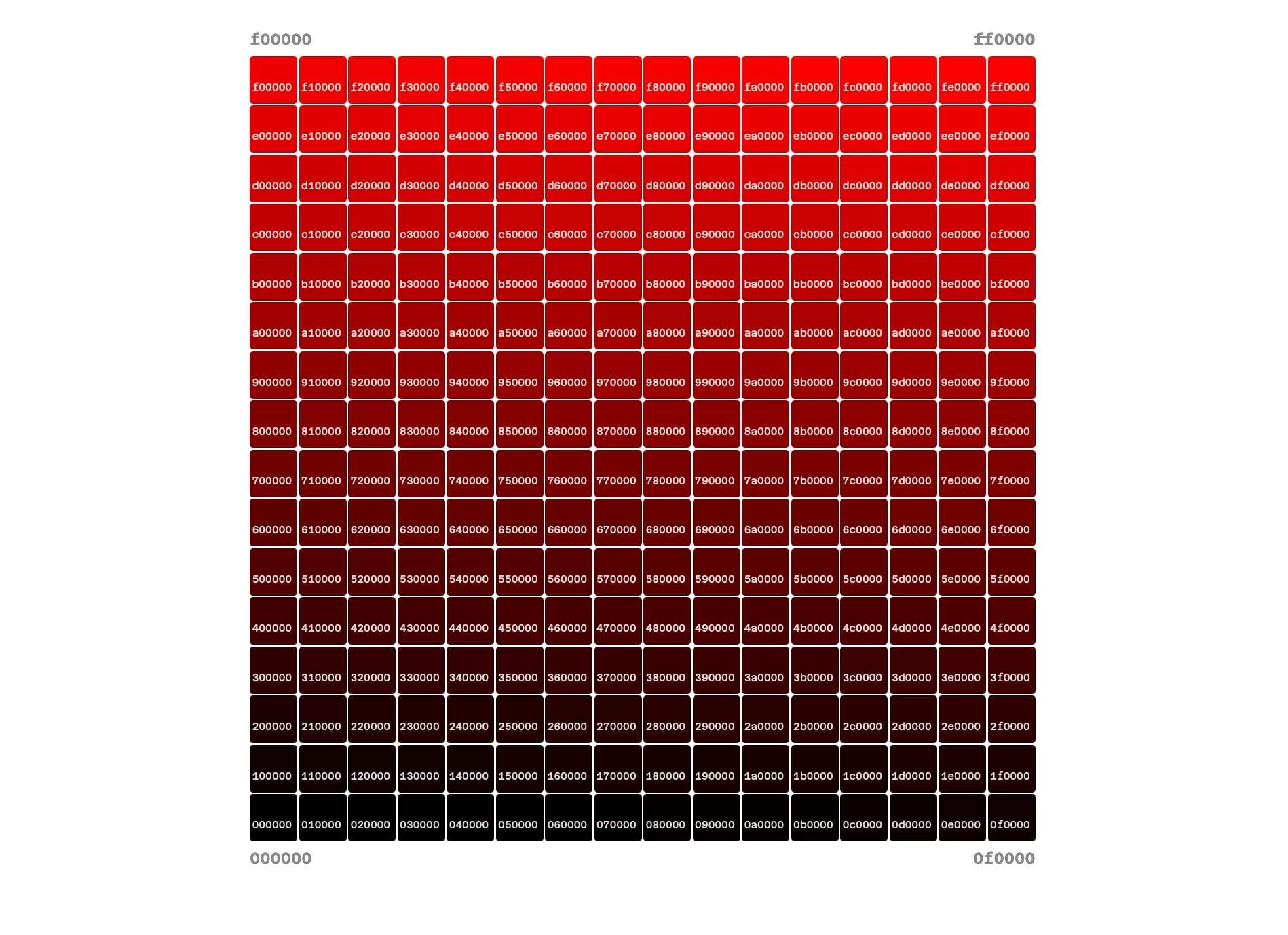
Quads: While the hex code as a whole operates in triplets (three/six channels, RRGGBB; six pure colors; and three color states, light, dark, and pure color), the individual color channels each have two digits (XX in the RR, GG, or BB channels) with two end states (0 or F). 2x2 means we've moved into quads.
For example, there are four possible end states for each channel: FF, F0, 0F, 00.
Color Pickers
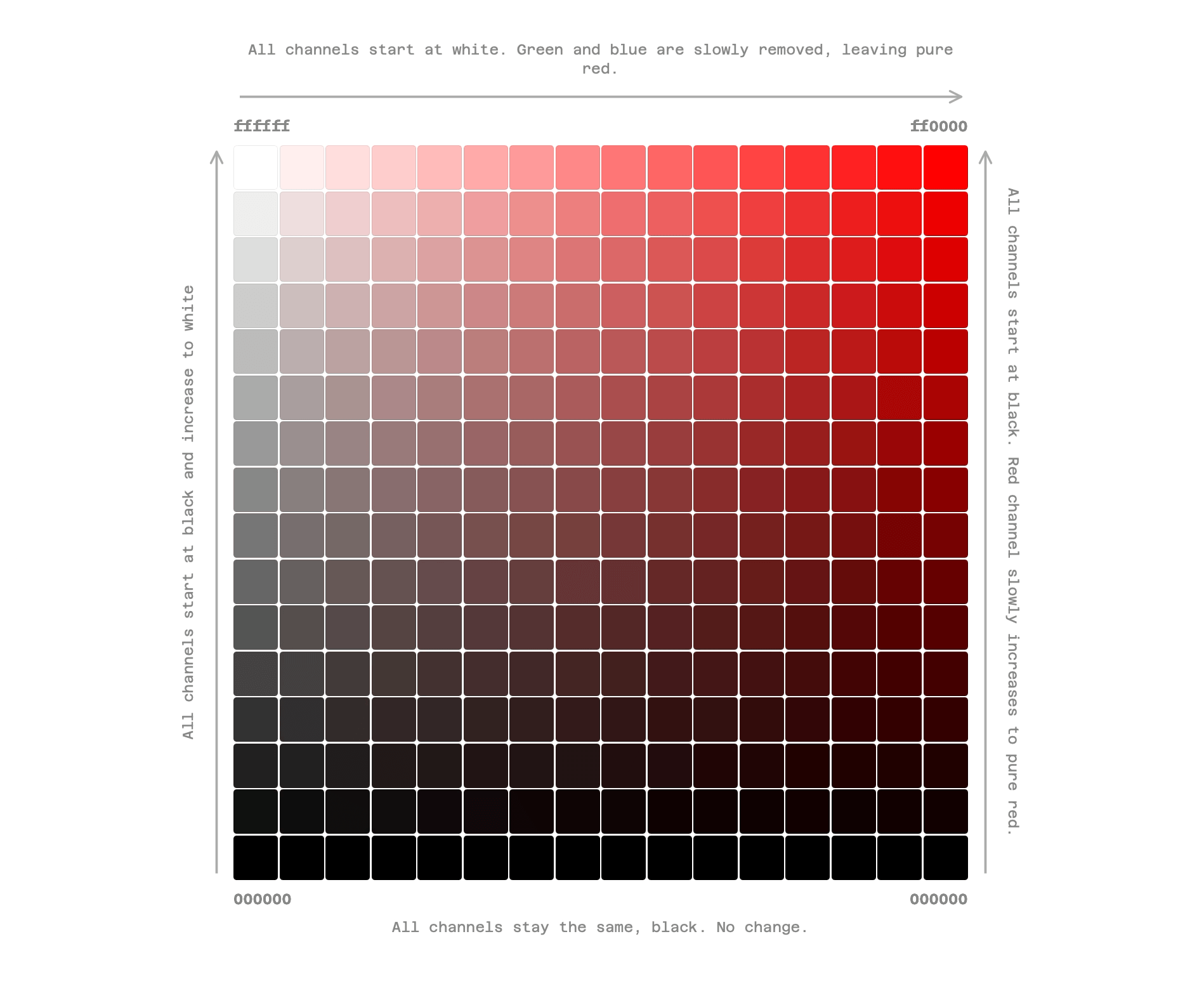
However, you may have noticed that color pickers usually don't look like the image above. Usually they have white in the top left (FFFFFF), black in the bottom left (000000), pure color in the top right (FF0000) and black in the bottom right again (000000).
The problem with this visual representation is that we now have black in two corners, when, conceptually, it only needs to be in one. Scroll up to revisit the triangle graphic above.
So what's actually happening here? We have white in one corner, red in the other corner, but black all along the entire bottom row? That seems odd, right?
Why Rectangles Became the Standard: Brightness and Saturation
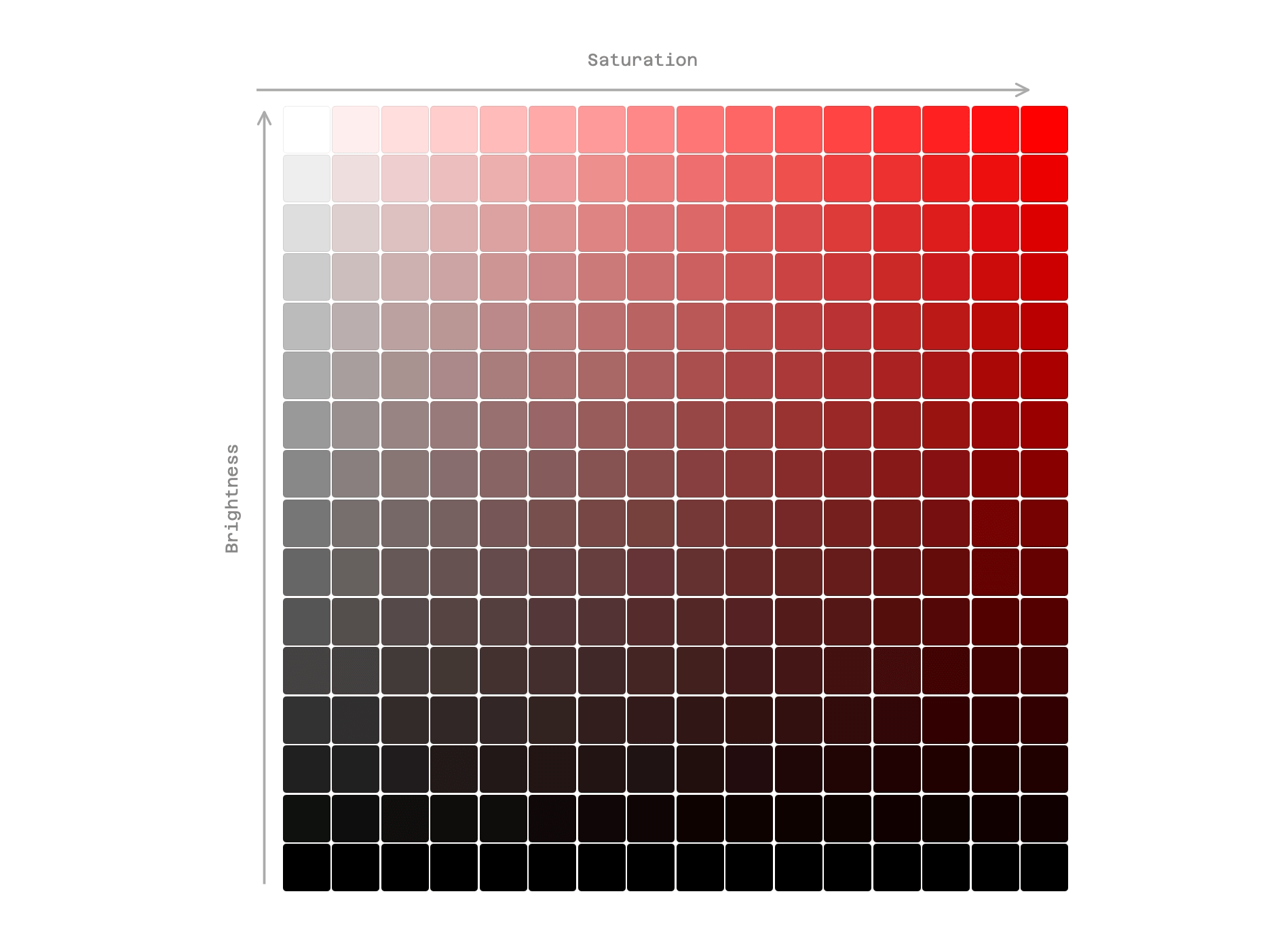
The rectangle format comes from HSB/HSV color model thinking, not hex. Most color pickers were designed around Hue, Saturation, and Brightness. They show saturation on the x-axis (left to right) and brightness on the y-axis (bottom to top), forming a rectangle. Hue is chosen from the Hue line, below the color picker rectangle.
This is why both bottom corners are black — brightness is zero across the entire bottom edge regardless of saturation. Black is what you get when brightness hits zero, no matter what the saturation is.
This pre-dates hex codes, conceptually. Hex codes were then mapped onto this rectangular representation after the fact. The rectangle was already standardized prior to thought being given to what shape and format hex codes should use.
RGB, 255, and Hex Channels
So what about the RGB color values that usually accompany hex codes in a color picker? Well, now that we know hex codes are made of RRGGBB as well, the two color coding systems are perfectly aligned. Each color channel in hex has two digits, each running 0–F (16 possible values). So the total combinations per channel are 16 × 16 = 256 possible values, ranging from 0 to 255. This is why R G B color codes are expressed with 0–255 per channel. Scroll back up to the color picker to see this in action.
CMYK
Now that you understand how RGB relates to hex codes, what about CMYK? This is simple. The K in CMYK simply stands for black. Remember how our CMY triangle earlier was much lighter than the RGB triangle? Well, in order to get darker colors, black needs to be added. CMYK is normally used for printing, particularly for printing onto white paper.
Half Steps, Symmetry and Contrast
You may have noticed, we haven't mentioned orange or purple on this page yet. To create both orange and purple, you need to use half steps or partial steps.
Since each digit in each hex color channel is divided into sixteen parts (0–F), it makes sense that 88 can be used as an easy way to remember what a half step between 00 and FF looks like. Eight is half of sixteen. However, we also have to remember that the numbering system runs from 0–15. So we could also consider 77 as an approximate half step as well. True halfway would be right in between, either 7F or 80, but 77 or 88 are close enough to be used for approximation purposes. The 256 step hex system splits evenly into halves, meaning, there is no single midpoint number, only the center number on either side of the split.
Putting this into practice, we can use a half step to create orange. Remember FFFF00 creates yellow (full red and full green). But full red and half green creates orange: FF8800.
Half steps can also give us insight into the way symmetry can be used in the hex system to create contrasting colors. For example, FF8800 and 0088FF are symmetrical. And they are also opposites on the color wheel.
In Summary
By now you should have a much better understanding of how hex codes work. There is always more to explore, but for now you've got the basics covered!